How to Deploy a Static Website on Ubuntu Linux Server using Nginx | CloudRox Project #1
Deploy your first production-ready static website on Ubuntu Linux Server with Nginx. Learn step-by-step installation, server configuration, deployment, verification, troubleshooting, and DevOps best practices through a real-world CloudRox project.


Deploy First Static Website on Ubuntu Linux Server | CloudRox DevOps Academy
CloudRox | CloudRox.in | Learning Platform: DevOps.CloudRox.in Project Track: Linux Server Administration | OS: Ubuntu 24.04 LTS
SEO Title: Deploy Your First Static Website on Ubuntu 24.04 LTS Server — Full Linux Admin Guide
Meta Description: Learn to deploy a production-grade static website on Ubuntu 24.04 LTS using Nginx. A complete CloudRox DevOps Academy hands-on Linux server project with diagrams, commands, and troubleshooting.
Slug: /deploy-first-static-website-ubuntu-linux-server
Focus Keyword: deploy static website on Ubuntu Linux server
Secondary Keywords: Nginx static website Ubuntu, Linux server hosting tutorial, Ubuntu 24.04 web server setup, UFW firewall Nginx
1. Project Introduction
Every DevOps engineer, every Linux administrator, and every cloud architect starts somewhere — and that somewhere is almost always the same place: hosting a static website on a Linux server. It sounds simple. It is not trivial. Behind that "simple" task sits real production knowledge: package management, web server configuration, file permissions, firewall rules, service management with systemd, log analysis, and troubleshooting under pressure.
At CloudRox, every new engineer joining the DevOps.CloudRox.in starts their journey with this exact project. Why? Because a static website deployment forces you to touch almost every fundamental subsystem of a Linux server without the noise of containers, orchestration, or CI/CD pipelines. You learn the server the way it actually behaves — raw, manual, and real.
This project is intentionally restricted to a single Ubuntu 24.04 LTS server. No Docker. No Git. No Jenkins. No cloud automation. No Kubernetes. Just you, the terminal, and the operating system. This is how senior Linux administrators were trained two decades ago, and it remains the strongest foundation today.
2. Business Scenario
CloudRox has signed a new client: "GreenLeaf Organics", a mid-sized agriculture export company based out of Pune, India. GreenLeaf wants a simple, fast-loading company profile website — no database, no login system, no e-commerce. Just HTML, CSS, and a handful of images describing their company, products, and contact details.
The client has one hard requirement: the website must go live on their own Ubuntu Linux server, hosted in their private data center (not a managed cloud platform), because their compliance team mandates full control over the infrastructure.
CloudRox assigns this task to you — a newly onboarded Linux System Administrator — as your first production deployment. Your manager, the Principal Linux Administrator at CloudRox, gives you the following brief:
"We are not using any automation tools for this one. I want you to provision the server by hand, understand every configuration line you write, and be able to explain it to a client auditor if asked. This is how we build engineers who can survive a 3 AM production outage."
3. Why This Project Exists
In real enterprise environments, before any automation (Ansible, Terraform, CI/CD) is introduced, every engineer must understand:
How a Linux server boots, runs, and manages services.
How a web server like Nginx serves files from disk to a browser over HTTP.
How firewalls, ports, and permissions protect or expose a server.
How to debug a "site not loading" issue at 2 AM without panicking.
This project builds that muscle memory. It is the same reason commercial pilots train extensively on manual flight controls before relying on autopilot — automation should never be a crutch for ignorance.
4. Business Requirement
ID Requirement Priority BR-01 Static website must be hosted on Ubuntu 24.04 LTS Must Have BR-02 Website must be served using a production-grade web server (Nginx) Must Have BR-03 Website must be reachable on standard HTTP port 80 Must Have BR-04 Server must have a firewall enabled, exposing only required ports Must Have BR-05 Website files must follow proper Linux ownership and permission standards Must Have BR-06 Server must log all access and errors for audit purposes Must Have BR-07 A custom 404 error page should be configured Should Have BR-08 The deployment must be reproducible and documented Should Have BR-09 No automation, container, or cloud tooling is permitted in this phase Constraint
5. Learning Objectives
By the end of this project, you will be able to:
Provision and update a fresh Ubuntu 24.04 LTS server.
Install, configure, and manage Nginx using systemd.
Understand Linux filesystem hierarchy and where web content belongs.
Apply correct Linux file ownership and permission models for a web server.
Configure UFW (Uncomplicated Firewall) to secure the server.
Create and enable a custom Nginx server block (virtual host).
Read and interpret Nginx access and error logs.
Troubleshoot common static website deployment failures.
Verify a working deployment using curl, browser, and log inspection.
Explain this deployment confidently in a job interview.
6. Final Architecture
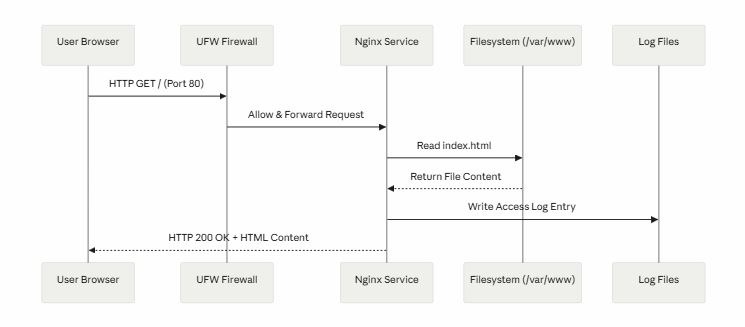
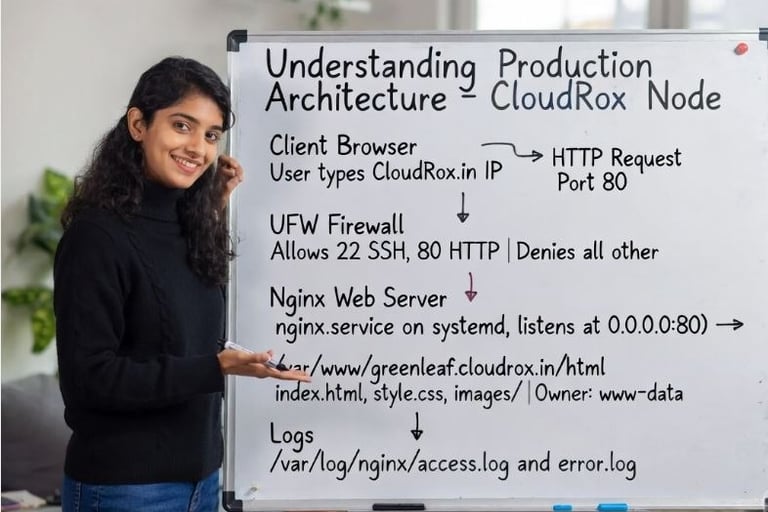
At the end of this project, the architecture will look like this — a single Ubuntu server running Nginx, serving static files to clients over HTTP, protected by UFW.
6.1 Diagram

6.2 Mermaid Diagram — Request Flow